'Camera Shake' is where you set your camera to 'Shutter Priority'. You'll need to use different camera settings if you're indoors or out as the pictures may be under-exposed. Whilst you're taking your picture, shake or vibrate the camera and the effect will appear.
Examples of 'camera shake'

Abstract Motion Blur
For 'Abstract Motion Blur' you will need to set your camera to 'Shutter Priority' and shutter speed to 1/2 or a second. If the picture you have taken is over exposed, reduce the shutter speed. To do this effect, you'll need to take an portrait of someone whilst you rotate the camera while you also zoom the lens or either
shake the camera.
Examples of 'camera shake'
 |
| Own image |
Abstract Motion Blur
For 'Abstract Motion Blur' you will need to set your camera to 'Shutter Priority' and shutter speed to 1/2 or a second. If the picture you have taken is over exposed, reduce the shutter speed. To do this effect, you'll need to take an portrait of someone whilst you rotate the camera while you also zoom the lens or either
shake the camera.
Examples of 'Abstract Motion Blur'
 |
| Own image |
 |
| Own image |
Light Writing & Painting
need a darkroom set and set your camera to 'Manual' (M) exposure mode. Set the shutter speed to how many seconds you would like as it depends on what you're planning on writing/painting or you could just use the B setting. Set the aperture. For example, f8. You could just use a torch for this or also use colour gels with it.
Examples of 'Light Writing & Painting'

.jpg&container=blogger&gadget=a&rewriteMime=image%2F*)
Ghosts
For the 'Ghost' effect, it'll be easier and look better for the effect outcome to look better as less light effects the lens. You will need to set the camera to 'Shutter Priority' and select a shutter speed you would like. For example, 4, 6 or 8. To do this, you would either need to keep the camera properly still or use a tripod for a better, steady effect. To do the effect, you'll need someone to be in the shot to make the 'ghost' effect and whilst the shutter speed is counting down, you will need someone to rush out of the shot half way through.
Examples of the 'Ghosts' effect
 |
| Own image |

Frozen Motion
For the 'Frozen Motion', you'll need the set
camera to a fast shutter speed. For example,1/200 - 1/500. If your pictures are under-exposed then increase the ISO. To get this motion, you could take a picture of someone jumping, running or even choose a shutter speed to give a motion blur effect.
Examples of 'Frozen Motion'


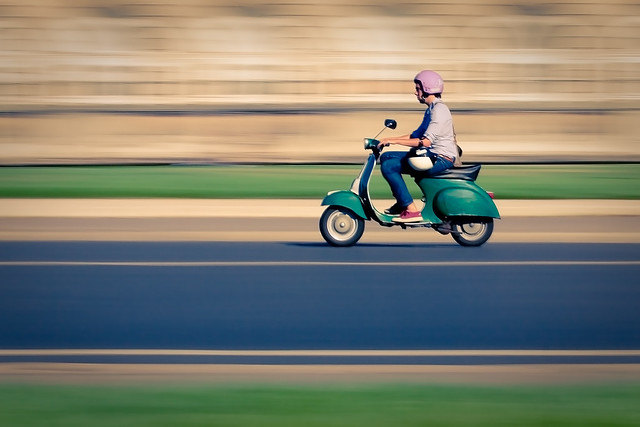
Panning
For the 'Panning' effect, you will need to use the 'Shutter Priority' mode yet again. Choose a sensible shutter speed as you will take a picture of someone running past or another example of some kind of movement whilst you 'pan' the camera to get the effect.
Examples of 'Panning'
 |
| Own image |


.jpg)


No comments:
Post a Comment